
DNI
Automatically display unique phone numbers for each visitor’s source - so you can see which campaigns drive real calls, conversions, and ROI.


Know what drives your calls
See which campaigns drive real conversations. From source and keyword to caller location and journey.

Gain visitor-level insights
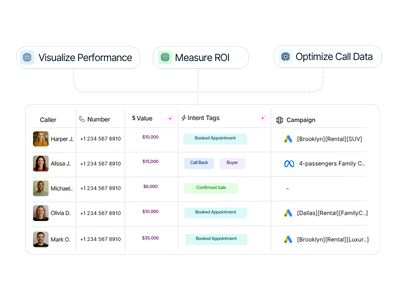
Access all visitor-level data inside Call Activity, where each call’s source, tags, and caller info are structured.

Measure ROI with precision
Connect every call to the campaign that drove it and focus your budget on what truly delivers revenue.
[01] Simple on-site installation
Get DNI live fast using one of three options: install the WordPress plugin, add it through Google Tag Manager, or embed a single line of code directly on your site.

[02] Swap Groups for Dynamic Number Swapping
Group and control your tracking numbers to dynamically swap them by source, location, or campaign - maintaining accuracy and clarity across all calls.

[03] Capture & Analyze insights
Track every call back to its source and uncover which campaigns, ads, or pages drive real conversations. Visualize performance, measure ROI, and optimize your marketing with actionable call data.
Easily configure your DNI script to capture calls your way
Group and manage multiple tracking sets to dynamically swap numbers by region, service, or campaign - while keeping attribution clean.
Control how call conversions are assigned by selecting first-click or last-click attribution to better understand your customer journey.
Capture call data securely from your server to ensure accurate attribution and seamless performance - no cookie loss, no data gaps, just consistent insights.
Access and transmit data saved in local storage to associate calls with user sessions, campaigns, and on-site actions - without relying solely on cookies.
Track calls accurately on single-page websites by detecting virtual page views and updating dynamic numbers without full page reloads.
Access and transmit data saved in local storage to associate calls with user sessions, campaigns, and on-site actions - without relying solely on cookies.
Wondering how many tracking numbers you actually need?
Use the in-app Pool Calculator to analyze your traffic and get the ideal number of tracking numbers - accurate attribution, no wasted budget.
Combine Nimbata call tracking features to create the solution
that matches how your team operates.

Tracking Numbers
Create tracking numbers for any channel or location

Call Flow Builder
Handle every call smarter - with automated call flows

Call Recordings
Capture every customer conversation automatically